


ALL EDITIONS
Physically correct flattening
Wrapstyler's unfolding algorithm handles surfaces made of several hundred thousand triangles and accounts for material elasticity, giving you patterns that match the finished part.

Polyquark
Wrapstyler turns 3D shapes into accurate 2D cutting patterns. Import a scan mesh or CAD surface, draw your seams in 3D, and generate flat patterns that account for how your material stretches. Built for upholstery, composites, orthopedic devices and printed film, Wrapstyler covers the full workflow from feasibility check to cutting table file.
Core difference:


WHAT IS WRAPSTYLER?
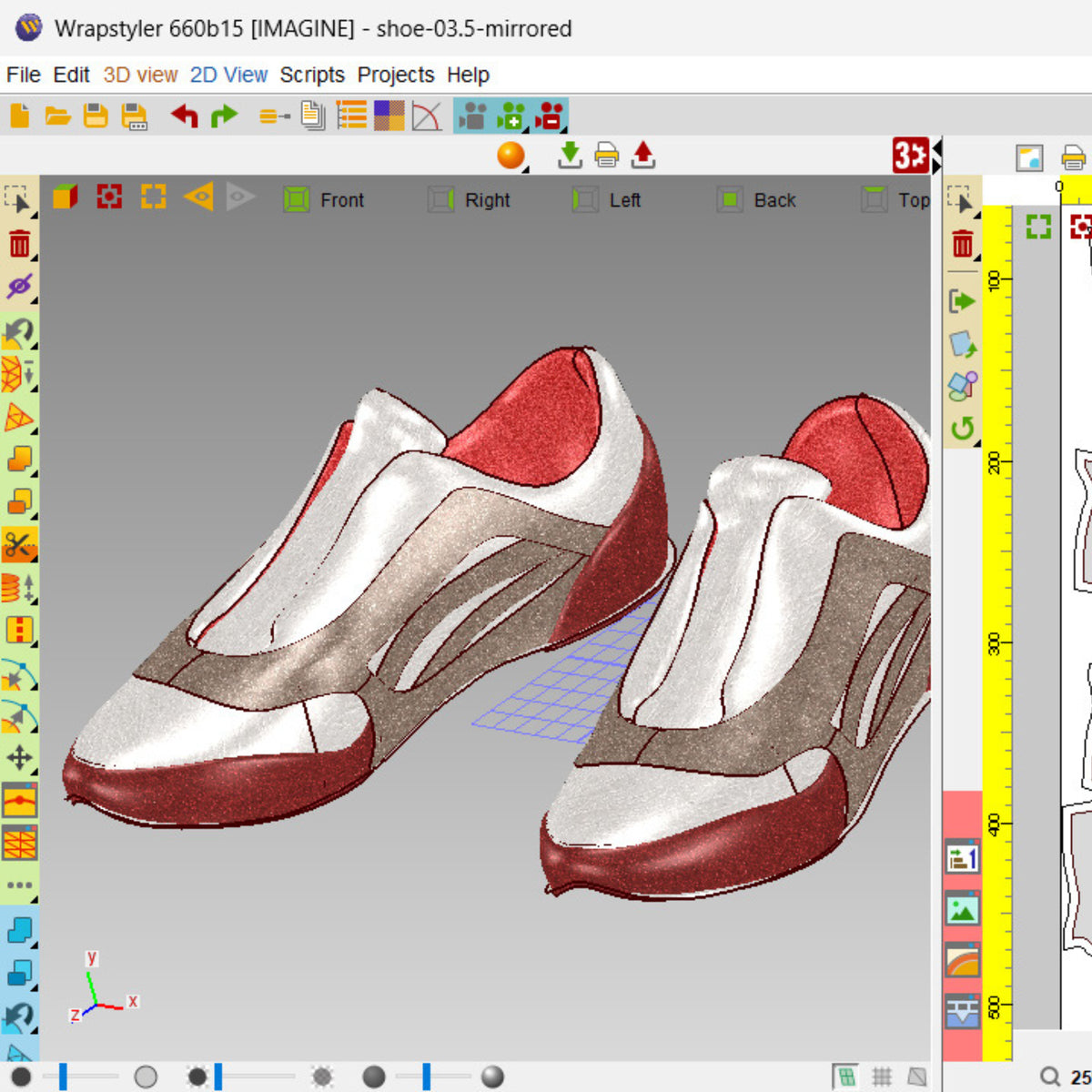
Wrapstyler calculates the flat patterns you need to cover any 3D surface, with seams, notches and assembly instructions ready for production.
Wrapstyler factors in the physical properties of your material, including fabric elasticity, so patterns fit the real part on the first cut.
See where a material will stretch or wrinkle before you cut anything. Wrapstyler shows whether to change the material, adjust the shape or move a seam.
The 3D view (parts) and 2D view (patterns) stay synchronized, so every seam change updates the pattern immediately.
Used by both seamstresses and engineers. The developer states that training takes 1 to 2 days at most.
COMPARE EDITIONS
Each edition includes everything in the one before it.
Best for basic covering
Best for composites, mechanical and orthopedic parts
Best for sewing in transportation, orthopedics and furniture
Best for the printed film industry, including transportation and architecture
Swipe horizontally to compare all options.
Key features
ALL EDITIONS
Wrapstyler's unfolding algorithm handles surfaces made of several hundred thousand triangles and accounts for material elasticity, giving you patterns that match the finished part.
Generate notches, seam allowances and sewing links automatically, then export an assembly notice your team can follow.
Project graphics across one or more trim parts. Projections are cut, mapped and connected on the 2D patterns automatically, ready for wide format printing.
Import STEP and IGES surfaces with built in meshers, or OBJ and STL meshes from 3D scanners.
3D cut line drawing
Draw seams directly on the 3D part with a full palette of cutting tools.
Cutting table export
Export DXF AAMA and PDF patterns for cutting tables and plotters, or print and cut by hand.
Applications

Pattern seats, headrests and furniture, whether traditionally upholstered, foam injected or fitted with removable covers.

Calculate plies for carbon and glass fiber parts with the multi ply function, grain line alignment and a quantified deformation report.

Calculate the 2D artwork (anamorphosis) to print for vehicle wraps, protective film and large displays.
Why buy from 3D Wonders
From your first demo to your first cut pattern.

✓ Authorized Partner
Wrapstyler Reseller
See Wrapstyler run on a part like yours and ask our team your questions.
Entry, Standard, Pro or Imagine: we help you pick the edition that matches your materials and output.
We help you get installed and running, and our team is here when you have questions.
Pair Wrapstyler with 3D scanner for a complete scan to pattern workflow.
No scanner yet? We can scan your part and deliver a mesh ready for Wrapstyler.

See the full workflow in real conditions. Book a live demo with our experts and scan your parts.
Speak with a 3D scanning specialist about specifications, workflows, and integration goals.
✓ You'll talk with a real person on our team, not a chatbot or AI.
Or email hello@3dwonders.com
Looking for something specific? Let us know, and we’ll be happy to assist you.
Wrapstyler is 3D to 2D flattening software. It converts 3D surfaces into flat cutting patterns, taking the material's physical properties into account, and adds notches, seam allowances and assembly instructions.
Entry suits basic covering. Standard suits composites and mechanical parts. Pro suits sewn products such as seats and orthopedic devices. Imagine suits printed film and wraps.
The developer states that training takes 1 to 2 days at most, and the software is used by both seamstresses and engineers.
OBJ and STL meshes from 3D scanners or modeling software, and STEP and IGES CAD surfaces (Standard edition and above).
Yes. Wrapstyler exports DXF AAMA and PDF, which most cutting tables and plotters accept. DXF AAMA export starts with the Standard edition. Patterns can also be printed and cut by hand.
Yes. Wrapstyler calculates plies for composite parts, aligns them using grain lines, and produces a deformation report showing positive and negative deformation per pattern.
Yes. The feasibility check shows where the material will stretch or compress and suggests whether to change the material, adjust the shape or move a seam.

NOW LIVE · ONLY AT 3D WONDERS
Save up to
$3000
on exclusive bundles + a mystery gift
+ STORE CREDIT BACK
for email subscribers
Subscribe now and earn 1% back as store credit on website orders from Nov 26 to Nov 30. Plus an extra 10% off accessories.
Subscribe and get an extra 10% off accessories on top of the Black Friday deals.
We’ve added the code to your cart. It applies at checkout on eligible accessories.
Shop Black Friday Deals