


What is Geomagic Freeform?
-

Why Engineers Use Geomagic Freeform for Organic CAD Modeling
Get a Free DemoEngineers use this software when traditional CAD software cannot easily handle:
- Organic shapes and ergonomic surfaces
- Complex 3D scan meshes from reverse engineering
- Patient-specific medical models
- Product surfaces requiring sculpted geometry
- Scan-to-CAD reconstruction workflows
-

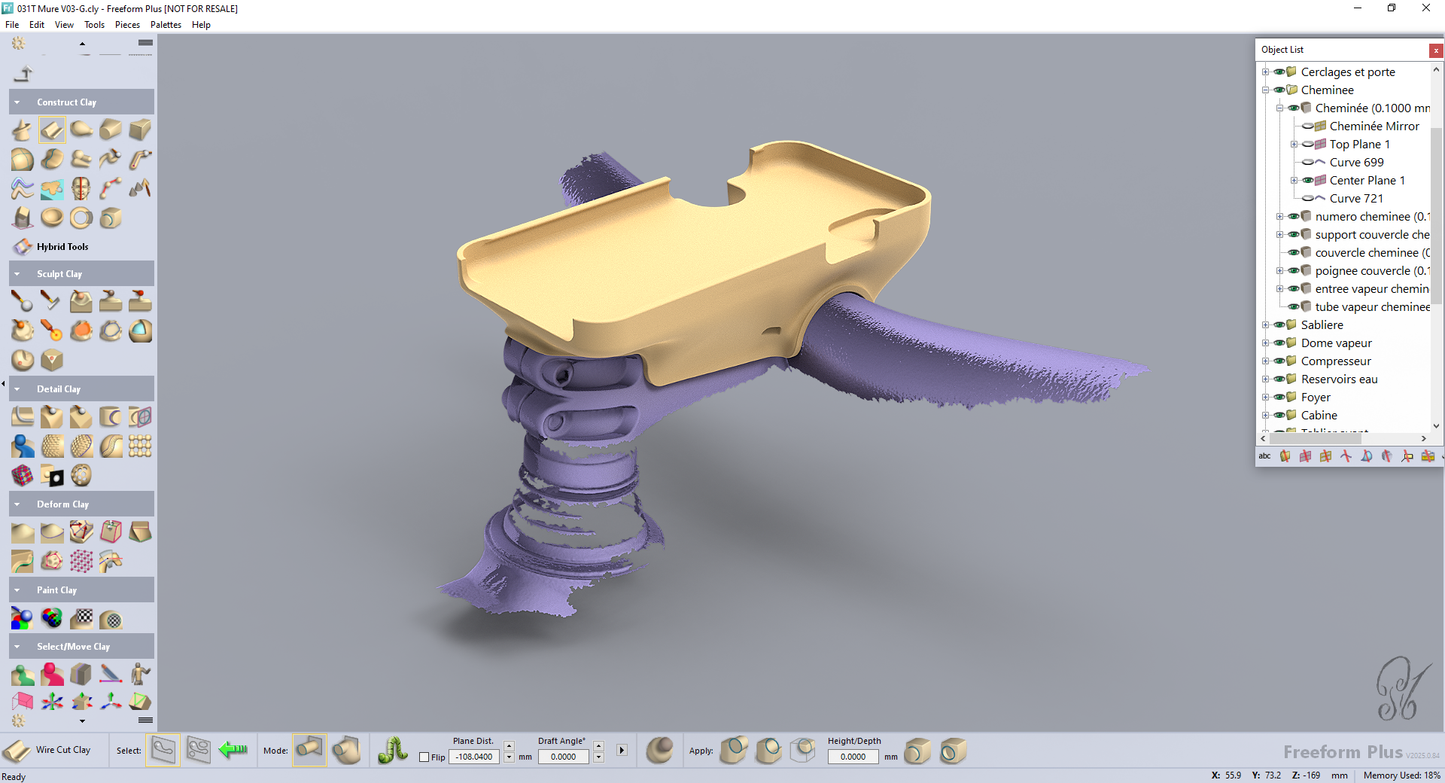
Editing scan data with Geomagic Freeform
Request a Free TrialModern product development often starts with physical parts that must be converted into digital models. A 3D scanner captures the geometry, but the resulting mesh usually requires editing before it can be used for manufacturing or CAD design.
Geomagic Freeform fits into the stage where raw 3D data must be refined, sculpted, and converted into usable design geometry.


Typical Workflow Using Geomagic Freeform

See How Businesses Use This in the Real World
-

Concept & Industrial Design (Freeform Modeling)
Create complex organic shapes, ergonomic forms, and detailed surfaces using intuitive freeform modeling tools, ideal for early-stage design and product development.
-

Medical Device and Healthcare
Design patient-specific models such as prosthetics, orthotics, and medical devices with complex organic geometry and customized fit.
-

Entertainment, Art & Sculptural Design
Develop highly detailed models for characters, collectibles, and artistic applications using digital sculpting workflows.
-

Manufacturing & Production Preparation
Prepare designs for manufacturing using hybrid modeling tools that combine organic geometry with CAD data for downstream workflows.


See Geomagic Freeform in Real Design Workflows
Geomagic Freeform vs Traditional CAD Software
| Traditional CAD | Hybrid Sculpt Modeling |
|---|---|
| Parametric features | Freeform sculpting |
| Clean geometry | Raw scan meshes |
| Mechanical parts | Organic surfaces |

Geomagic Software Training
3D Wonders offers live online training for Geomagic software, including Design X, Control X, and Geomagic Freeform. These sessions help engineers and designers learn the key workflows used in scan-to-CAD modeling, inspection, and organic design.
Training is delivered by experienced specialists and focuses on practical techniques for working with 3D scan data, CAD reconstruction, and digital modeling.
Available topics include:
• Reverse engineering with Geomagic Design X
• Inspection and GD&T analysis with Geomagic Control X
• Organic modeling with Geomagic Freeform
Our online training sessions can be organized for individuals or teams and adapted to your workflow and experience level.
Computer Requirements
| Category | Minimum Requirements | Recommended Workstation |
|---|---|---|
| Operating System | Windows 10 (64-bit) or Windows 11 | Windows 11 |
| Processor (CPU) | Intel or AMD 64-bit processor | Intel Core i7/i9 (13th gen or newer) or AMD Ryzen 7/9 (5000 series or newer) |
| Memory (RAM) | 8 GB | 32 GB or more |
| Graphics (GPU) | NVIDIA GPU with OpenGL 4.0 support and 2 GB VRAM | NVIDIA workstation GPU |
| Storage | 30 GB free disk space | SSD with 512 GB or larger |
Function Features Comparison
Start Using Geomagic Freeform
Frequently Asked Questions
Looking for something specific? Let us know, and we’ll be happy to assist you.
Geomagic Freeform is used to design complex, handcrafted-style sculptural and highly organic forms that are typically too difficult or chaotic for traditional parametric CAD systems to handle. It essentially bridges the gap between artistic, artisanal design and strict digital manufacturing standards.
Yes, it can. Specifically, the Freeform Plus tier features Auto-Surfacing capabilities that automatically convert 3D scan meshes (polygons) and digital clay into mathematically precise NURBS surfaces (CAD models).
While the standard Geomagic Freeform provides a comprehensive organic design, scan processing, and 3D sculpting toolset, Freeform Plus includes advanced manufacturing and tooling features. The Plus version adds capabilities such as SubD-to-NURBS conversion, complex draft analysis and correction, automated mold parting line generation, and advanced CAD solid/surface tools.
Yes, it is designed to handle massive datasets produced by modern non-contact 3D scanners. It also features direct software integration with hardware like Artec 3D scanners, allowing users to capture objects directly into the Freeform workspace for immediate editing.
Yes, it integrates seamlessly with downstream CAD and CAM workflows. It can export hybrid models as standard industry-neutral formats like IGES, STEP, STL, OBJ, and PLY, while Freeform Plus supports additional native CAD formats.
It is widely used in industries requiring intricate and organic designs. This includes healthcare (patient-specific medical implants, prosthetics, and orthotics), consumer products, toys and collectibles, footwear, jewelry, coins, ceramics, and fine arts.
Yes, it is an excellent tool for reverse engineering, particularly when dealing with organic, free-flowing, or highly ergonomic shapes. However, if the reverse engineering project consists entirely of rigid, prismatic mechanical parts, Hexagon's other software, Geomagic Design X, is usually the preferred tool.
No, a haptic device is not strictly required. The software refers to the haptic interface as an "optional" hardware addition. However, using a haptic device is highly recommended because it provides physical force feedback, significantly boosting productivity by mimicking the sensation of carving real clay.
It supports a broad spectrum of 3D data. This includes polygon/mesh formats (STL, OBJ, PLY), CAD neutral formats (IGES, STEP), medical volumetric data (DICOM, image stacks), and native CAD formats (like .x_b, .x_t, and .sldprt).
Because voxel modeling is computationally heavy, high-end workstations are recommended. The latest recommended specs include a 64-bit Windows 10 or 11 operating system, an Intel Core i7/i9 (13th generation or newer) or AMD Ryzen 7/9 (5000 series or newer) processor, 32 GB or more of RAM, an NVMe SSD with at least 512 GB of storage, and an NVIDIA GPU with OpenGL 4.0 support.


