Skip to product information
1 of 1

Shining 3D

EXModel Reverse Engineering Software

EXModel Reverse Engineering Software

Regular price $432.00 USD
Regular price $540.00 USD Sale price $432.00 USD
Sale Sold out
Shipping calculated at checkout.
License Type
License Duration

EXModel is the ultimate native reverse engineering software native for Shining 3D products, delivering a powerful bridge that simplifies CAD modeling from 3D scanning to manufacturing. It provides a comprehensive set of tools that enable you to seamlessly transform complex scan data into professional-grade CAD digital models that are fully compatible with your existing native CAD environment. 


Core difference:

  • EXModel Lite: Bridging 3D scan mesh and CAD.

  • EXModel Pro: All-in-one Reverse Engineering Solution.


View full details

What is EXModel?

EXModel is a native Shining 3D reverse engineering software designed to transform raw scan data into manufacturing ready CAD models. It allows users to process large mesh data and seamlessly extract design features using an intuitive, cost effective platform. 

Featuring a dedicated scan data preparation wizard, precise 2D and 3D geometry primitive extraction, automatic surfacing, and real-time deviation control, EXModel functions as an efficient standalone bridge that optimizes your entire scan-to-CAD workflow.

  • Why User Use EXModel for Reverse Rngineering

    Optimized natively for Shining 3D workflows, EXModel is an intuitive, cost effective reverse engineering software. It features real time accuracy checks and robust extraction tools, letting designers quickly convert raw scans into precise CAD models without a steep learning curve.

    Get a Free Demo
  • Reverse Engineering with EXModel

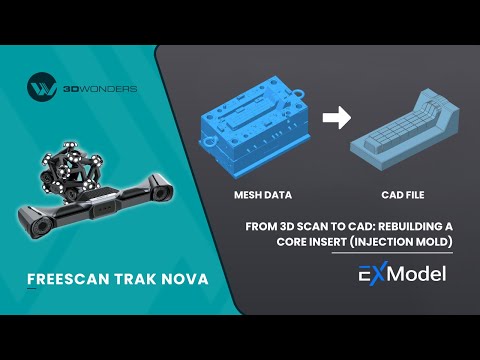
    EXModel streamlines the transition from raw scans to production ready CAD. Using its scan preparation wizard and parametric extraction tools, you can easily clean meshes, rebuild solid elements, and export standard IGES or STEP files directly to manufacturing.

    Request a Free Trial
1 of 2

Typical Workflow Using EXModel

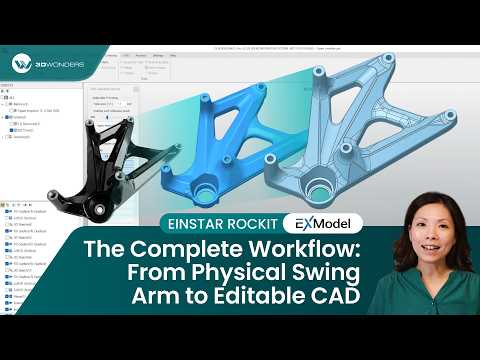
A typical design workflow using EXModel includes the following steps:

  1. Import scan data directly from your Shining 3D scanner into the software workspace.
  2. Utilize the scan data preparation wizard to efficiently align coordinates, fill holes, and smooth the mesh profile.
  3. Execute the modeling process using 2D and 3D geometry primitive extraction, hybrid modeling, and freeform auto surfacing.
  4. Export the finalized CAD file as industry-standard formats for seamless integration with downstream manufacturing packages.

EXModel empowers users to transition from physical scan data to precise, manufacturing-ready digital models effortlessly.

  • Scan Data Preparation Wizard

    Streamline your initial mesh setup with an intuitive wizard designed to automatically align coordinates, clean defects, and prepare raw data for design extraction.

  • Large Mesh Data Processing

    Import and smoothly process high-density, large mesh data arrays without experiencing graphics system lag or processing bottlenecks.

  • 2D & 3D Geometry Primitive Extraction

    Extract foundational shapes like planes, cylinders, and spheres directly from the scan data to construct accurate sketching and modeling references.

  • Automatic and Freeform Surfacing

    Reconstruct complex, organic shapes quickly using automated feature-aligned fit surfacing and manual freeform modeling workflows.

  • Hybrid Modelling of Solids and Freeform Surfaces

    Combine rigid parametric design tools with flexible freeform shapes inside a single workspace to develop sophisticated hybrid models (Exclusive to EXModel Pro).

  • Real Time Deviation Control and Accuracy Check

    Validate your geometry continuously using a live deviation color map to verify that your CAD model remains precise to the original scan mesh.

1 of 6
  • EXModel Lite

    Bridging 3D scan mesh and CAD

    What it includes:

    Complete mesh editing, accurate coordinate alignment, core geometric extraction, freeform fit modeling with auto surfacing, and direct export to standard IGES, STEP, and DXF files.

    Best for:

    Shining 3D scanner users needing direct mesh processing, geometry alignment, and primitive reference extraction to bridge into external CAD ecosystems.

  • EXModel Pro

    All-in-one Reverse Engineering Solution.

    What it includes:

    Everything in standard EXModel, plus advanced Hybrid Modeling, parametric tools, mechanical surfacing, constrained 2D sketching, and native design transfer with feature history tree export to major CAD packages.

    Best for:

    Advanced engineering users demanding a complete, standalone platform to build fully parametric solid models without requiring secondary CAD environments.

1 of 2
  • Industrial & Manufacturing

    Machinery shops utilize primitive feature extraction and coordinate alignment to turn raw scan data into production-ready CAD components.

  • Product Design & Creative

    Industrial designers apply freeform modeling and auto surfacing tools to convert handcrafted mockups into editable digital concepts.

  • Automotive & Aerospace

    Engineers clean up complex aftermarket components with the scan data preparation wizard and rebuild geometric engine components accurately.

  • Healthcare & Medical

    Orthotics technicians smoothly process large mesh data of the human body, removing scan noise and refining shapes for custom ergonomic solutions.

1 of 4

See EXModel in Real Design Workflows

As an authorized Gold Reseller of Shining 3D. 3D Wonders provides licensed software, expert onboarding, and dedicated customer support—ensuring you get the most from every update.

Simplify the data transition from physical objects to final manufacturing using a native, cost effective reverse engineering pipeline.

  • Native Workflow Optimization

    Eliminate compatibility barriers and streamline feature capture by utilizing software built specifically to support your hardware.

  • Reduced Design Cycles

    Minimize manual sketching bottlenecks with automated primitive extraction and a dedicated scan data preparation wizard.

1 of 2

Computer Requirements

Category Requirements
Operating System Windows 10 (64-bit) or Windows 11
Processor (CPU) Intel i5 or higher (or its equivalent of another CPU manufacturer)
Memory (RAM) 16 GB
Graphics (GPU) Dedicated graphics card – nVidia or AMD
Storage 256 GB

Function Features Comparison

Feature EXModel Pro EXModel
Mesh Editing (Fill Holes, Smoothing, Editing Boundaries)
Mesh Alignment (Coordinates/ N-points/ Fine Align)
Primitives Extraction/ Construct References
Cross Sections/ 2D Sketching/ 3D Sketching
Fit/ Manual Free Form Modelling/ Auto Surfacing
Export Features/ Profile as IGES/ STEP/ DXF
Extrude/ Revolved Surfaces
Helix/ Loft/ Sweep/ Fill Surface (Class A surfaces)/ Blend surface/ Flatten
Constraints/ Offset/ Patterns/ Sketch Assist in 2D Sketch
Unroll Mesh & Roll 2D Sketch
Trim to Solid/ Cut/ Combine/ Intersect/ Fillet/ Chamfer/ Patterns
Hybrid Modelling (Free-Form & Parametric)
Transfer Design and Feature Tree to other Packages
Compare Mesh vs Mesh

Start Using EXModel

EXModel provides the ultimate native workflow optimization to bridge 3D scanning and manufacturing, delivering a fast, cost-effective route to precise CAD creation.

Frequently Asked Questions

Looking for something specific? Let us know, and we’ll be happy to assist you.

What makes EXModel unique compared to other reverse engineering software?

EXModel is built as the native reverse engineering software for Shining 3D products, ensuring seamless workflow compatibility and high-performance data processing.

Does EXModel include tools to fix raw meshes?

Yes. It features a comprehensive scan data preparation wizard to handle mesh segmentation, fill holes, and smooth data before modeling extraction.

Can I extract standard geometric references from the scan data?

Yes, it includes built-in 2D and 3D primitive geometry extraction to effortlessly generate accurate planes, cylinders, spheres, and cross-sections.

What export formats are supported?

Both versions allow you to export your completed geometry features and profiles as standard IGES, STEP, and DXF files.

Does the software feature an accuracy check against the scan?

Yes, it includes a real-time deviation control function that displays a live color map to ensure your CAD model matches the original scan data.

Is hybrid modeling supported in the standard EXModel version?

No, advanced hybrid modeling of solids and freeform surfaces is a powerful feature exclusive to the EXModel Pro tier.

Can I use this software to transfer design history trees?

Yes, transferring your complete feature design tree directly into external CAD packages is fully supported using the EXModel Pro edition.

How does the software handle large, high-density mesh files?

The platform is engineered for large mesh data processing, optimizing resource utilization to allow smooth scaling and extraction on dense geometry.

Can I perform auto surfacing on organic forms?

Absolutely. Automatic surfacing and manual freeform modeling tools are fully supported across both software versions.

Does the standard version support parametric sketching tools?

The standard version supports baseline sketching, but advanced constraints, offsets, and patterns within 2D sketches require EXModel Pro.