
Skip to product information
1 of 5

EXMeasure - 3D Measurement Software

EXMeasure - 3D Measurement Software

Regular price $699.00 USD
Regular price Sale price $699.00 USD
Sale Sold out
Shipping calculated at checkout.

EXMeasure brings PTB certified measurement tools into a focused workspace for 3D inspection and dimensional measurement. Import scan and CAD data, align models, analyze deviations, evaluate key dimensions and GD&T, and generate clear inspection reports in one workflow.

View full details

What is EXMeasure?

EXMeasure is a focused 3D inspection software and dimensional measurement software built on SHINING3D's PTB certified measurement engine. It gives teams a lighter, more approachable way to align scan data, check GD&T, and generate inspection reports without the full feature set of SHINING3D Inspect.

The software streamlines the scan to CAD inspection workflow into four steps: import and manage scan and CAD data, align models, compare and measure deviations, and generate clear, exportable reports.

  • Why Users Choose EXMeasure for 3D Measurement

    EXMeasure's tile interface keeps core functions visible and accessible, helping operators complete routine measurement and GD&T tasks in fewer steps, without the learning curve of a full inspection suite

    Get a Free Demo
  • 3D Measurement & Deviation Analysis with SHINING 3D Inspect

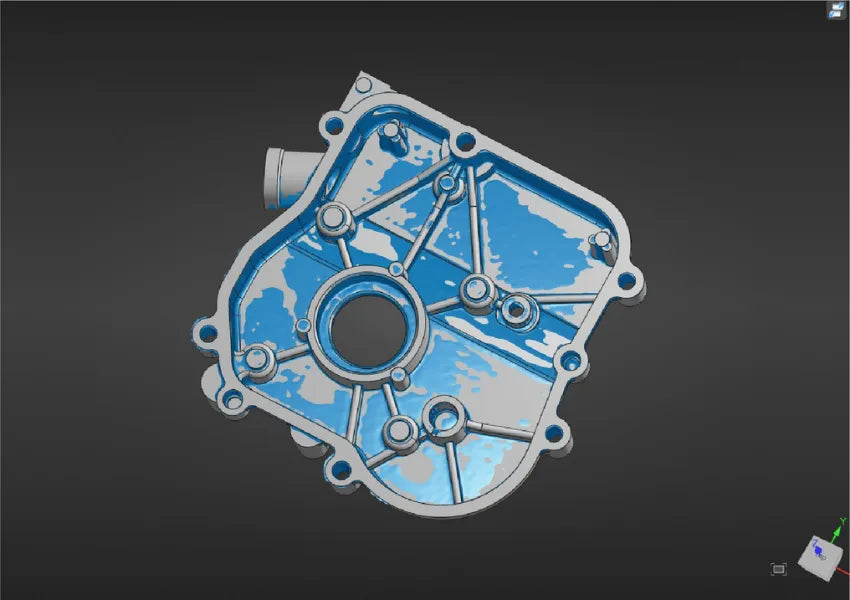
    Perform full field comparisons between scan data and reference models to catch deviations early and verify tolerance compliance. Visualize results with customizable color maps and tolerance bands for immediate pass or fail interpretation.

    Talk with our 3D Specialist
1 of 2

Typical Workflow Using SHINING 3D Inspect

A typical 3D Measurement workflow using EXMeasure includes the following steps:

  1. Load reference and measurement models, then create, open, or save your project.
  2. Align scan data to reference CAD using Best-fit, transformation, manual, or coordinate system alignment.
  3. Analyze deviations, dimensions, GD&T, area, volume, and caliper distances between features.
  4. Organize results into snapshots, 3D views, and tables, then export to PDF.

EXMeasure takes you from raw scan data to decision ready measurement results, turning scan data into inspection results in one focused workflow.

  • One-Click Best Fit

    A streamlined tile interface keeps core functions visible, helping operators complete routine measurement tasks in fewer steps.

  • Full-Field 3D Comparison

    Compare scan data with reference models and generate a deviation color map with tolerance bands for immediate pass or fail interpretation.

  • Versatile Feature Construction

    Build points, lines, planes, circles, spheres, cones, and cylinders using CAD selection, fitted data, or anchored methods.

  • Essential GD&T Evaluation

    Set datums and inspect straightness, flatness, circularity, cylindricity, parallelism, and perpendicularity with clear tolerance results.

  • Precise Measurement

    Use a virtual caliper to measure internal and external diameters, distances, and angles between points, lines, and planes.

  • Streamlined Reporting

    Organize results into snapshots, 3D views, and tables, then export to PDF for fast, shareable documentation.

1 of 6
  • SHINING3D Inspect

    Complete Inspection Solution

    What it includes:
    Scan mesh processing, probing, full local and 2D comparison, section creation, feature creation from CAD across all geometry types, application oriented inspection modules, and fully customizable, automated reporting.

    Best for:
    Manufacturing and QC teams running comprehensive, high volume inspection, including automated and robotic inspection setups.

  • EXMeasure

    Focused 3D Measurement Toolkit

    What it includes:
    One-click Best-fit alignment, full field 3D comparison, essential feature construction (points, lines, planes, circles, spheres, cones, cylinders), GD&T evaluation, and standard PDF reporting.

    Best for:
    Teams that need fast, accurate dimensional measurement and GD&T checks without the full inspection suite, application modules, or CAD feature extraction.

1 of 2
  • Industrial & Manufacturing

    Align cast and machined parts to reference CAD using best fit alignment and cylinder feature search, verifying part geometry in minutes on the shop floor.

  • Product Design & Creative

    Streamline prototype validation with full field 3D comparison, visualizing deviations directly on the part to catch design issues before tooling.

  • Automotive & Aerospace

    Check cylinder diameters, datum planes, and parallelism on cast components with GD&T evaluation, flagging deviations against tolerance in real time.

1 of 3

As an authorized Gold Reseller of Shining 3D. 3D Wonders provides licensed software, expert onboarding, and dedicated customer support—ensuring you get the most from every update.

  • Lower Barrier to Entry

    Get core measurement and GD&T capability without the cost or learning curve of a full inspection platform.

  • Faster Operator Onboarding

    A simplified tile interface gets new operators running routine measurements with fewer steps and less training.

Computer Requirements

Category Requirements
Operating System Windows 10 (64-bit) or Windows 11
Processor (CPU) Intel i5 or higher (or its equivalent of another CPU manufacturer)
Memory (RAM) 8 GB or above
Graphics (GPU) Dedicated GPU, 6 GB VRAM or above
Storage 512 GB or above

Function Features Comparison

Primary Function SHINING3D Inspect EXMeasure
Import/Export Functions ✓ ✓(Repair and reference point not supported)
Project Functions ✓ ✓(Template not supported)
Scan Mesh ✓ ✗
Probing Functions ✓ ✗
Alignment ✓ ✓
3D Comparison ✓ ✓
3D Local Comparison ✓ ✗
2D Comparison ✓ ✗
Section Creation ✓ ✗
Create Features from CAD ✓ ✗
Point Feature Creation ✓ ✓
Line Feature Creation ✓ ✓
Plane Feature Creation ✓ ✓
Circle Feature Creation ✓ ✓
Sphere Feature Creation ✓ ✓
Cone Feature Creation ✓ ✓
Cylinder Feature Creation ✓ ✓
Slot Feature Creation ✓ ✗
Regular Polygon Feature Creation ✓ ✗
Rectangle Feature Creation ✓ ✗
Plate Feature Creation ✓ ✗
Surface Feature Creation ✓ ✗
Polyline Feature Creation ✓ ✗
Inspection Module ✓ ✓
Measurement Module ✓ ✓
Report Functions ✓ ✓(CSV format not supported)
Application Module ✓ ✗
Tree View Functions ✓ ✓

Start Using EXMeasure

Get fast, accurate dimensional measurement and GD&T evaluation in one streamlined 3D inspection workflow.

Frequently Asked Questions

Looking for something specific? Let us know, and we’ll be happy to assist you.

How can I purchase EXMeasure?

EXMeasure is available in two ways:
If you are an EinScan Trak user, you will receive a free one-year EXMeasure license. Simply download and install the EXScan Trak software package, and EXMeasure will be installed on your computer automatically.
If you would like to purchase EXMeasure separately, you could consult with us at 3D Wonders.

Is there a free trial of EXMeasure?

Currently, EXMeasure does not offer a free trial. Other promotional offers may be available depending on the product model purchased.

What is the difference between EXMeasure and SHINING3D Inspect?

Compared with SHINING3D Inspect, EXMeasure does not support direct scanning with a 3D scanner and does not include metrology inspection capabilities or specialized customization modules.
SHINING3D Inspect provides more feature set for functions in feature creation, GD&T inspection, and model alignment sessions. For a detailed comparison, please refer to the features comparison table or consult with us to choose which one is better suit to your needs.

Does EXMeasure support GD&T standards?

Yes. EXMeasure supports datum setting and evaluates straightness, flatness, circularity, cylindricity, parallelism, and perpendicularity, with clear results showing whether values are in tolerance or outside it.

Can I extract features directly from CAD?

No. Feature creation from CAD is available in SHINING3D Inspect but not in EXMeasure. EXMeasure builds features from CAD selection, fitted data, or anchored construction methods instead.

Does EXMeasure support scan mesh editing or probing?

No. Scan mesh processing and probing functions are available in SHINING3D Inspect but not included in EXMeasure.

Can I export inspection reports?

Yes. Reports can be organized into snapshots, 3D views, and tables, then exported to PDF. CSV export is not currently supported.